
I asked my agent to generate the tests for a class with 12 methods. It took 40 seconds. I would’ve taken two hours, coffee breaks and all. That’s Copilot agent mode at full speed, once you let it run.
That’s not magic. It’s a four-step process that loops until the task is done. Once you understand it, everything Copilot’s Agent mode does stops looking like a party trick.
An agent is not a chatbot on steroids
A traditional chatbot answers. You ask, it replies, interaction over. An AI agent acts instead: it makes decisions, executes tasks, checks the outcome, and adjusts its next move without you having to spell out every line.
The difference isn’t the language model underneath (it can be the exact same one), it’s the loop wrapped around it.
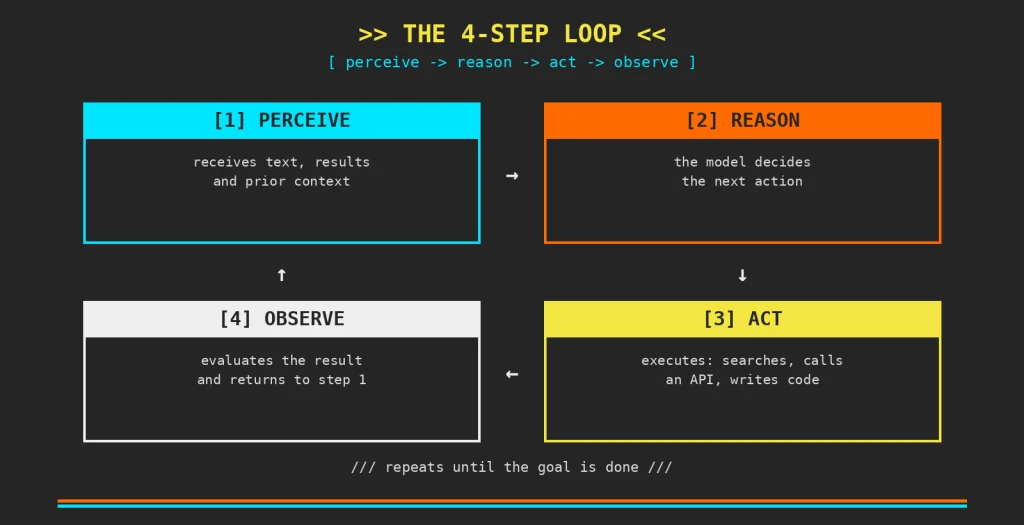
The 4-step loop
Perceive. The agent takes in information from its environment: text, results from previous tool calls, conversation context. That’s its only window into the world. If it’s not in this step, the agent doesn’t know it.
Reason. With that information, the model analyzes the situation and decides which action makes the most sense to move toward the goal. This is where the “thinking” happens.
Act. The agent executes the chosen action: searches the web, queries a database, calls an API, writes code. What’s possible depends on which tools it has wired up, not on the model itself.
Observe. It picks up the result of that action and folds it back in as new information. Back to step 1. The loop repeats until the goal is met or it needs you to step in.
Four steps, no mystery. What’s actually interesting isn’t the loop, it’s how fast it repeats and how many tools are plugged into it.
In practice: GitHub Copilot in VS Code
No special setup needed: Copilot agent mode ships built into VS Code:
1. Open the Copilot Chat panel with Ctrl+Alt+I.
2. In the mode dropdown, pick Agent instead of Ask or Edit. If you’re in a hurry, Ctrl+Shift+I jumps straight into agent mode without going through the dropdown [VS Code docs].
3. Type an instruction in plain language. For example:
Build a basic web app with a contact form and save the submissions to a JSON file.The agent scans your codebase, reads the relevant files, proposes edits, and runs terminal commands. It doesn’t stop after a single reply, it keeps executing and refining steps until the goal is reached or it needs your input.
Real example: generating unit tests in Spring Boot
1. Open your project in VS Code and switch to Agent mode.
2. Fire off this prompt:
Analyze the UserService.java class, identify every public method, and generate unit tests with JUnit 5 and Mockito for each one. Cover the happy path and error cases.The agent explores the project to understand the context, generates the test class, runs the tests in the terminal. If any fail, analyzes the error and fixes it on its own. Coverage ready in minutes, without leaving the editor.
Other things your agent can do
Agent mode isn’t just for tests. A few tasks where it makes a real difference day to day:
– Refactoring legacy code across multiple files with a single prompt.
– Migrating an API between Spring Boot versions, updating dependencies and config along the way.
– Generating technical documentation (Javadoc, OpenAPI) from existing code.
– Finding and fixing security vulnerabilities in the codebase.
– Scaffolding a new microservice from scratch, following your project’s own patterns.
– Automating code review before a pull request.
– Translating code between languages or frameworks.
Ask, Edit, or Agent: which one, when
The three modes exist for a reason — each is tuned for a different kind of task, they’re not interchangeable [GitHub Blog]:
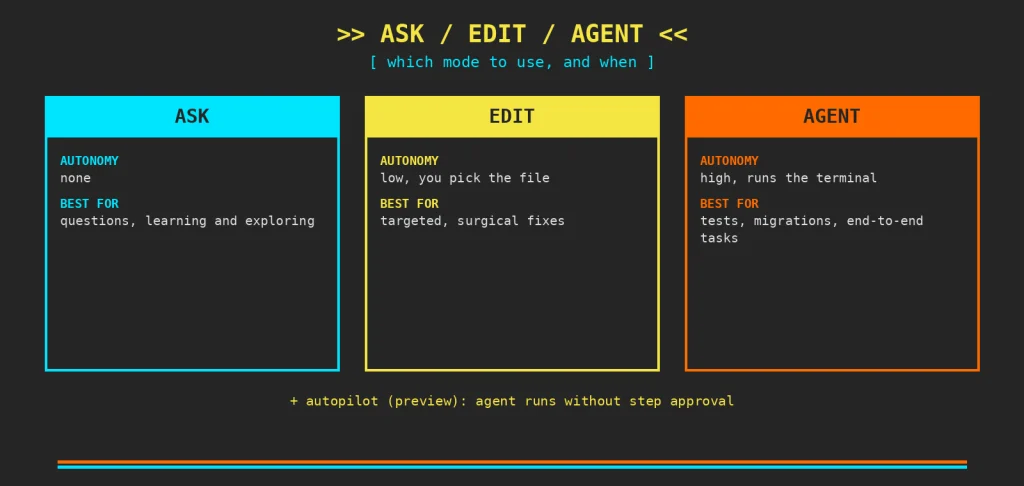
Ask. For questions and quick lookups, no autonomy. Best for learning and exploring without touching the code.
Edit. For changing specific files you select yourself. Low autonomy, high control. Best for targeted fixes.
Agent. For complex, multi-file tasks. High autonomy, runs the terminal, self-corrects. Best for tests, migrations, and end-to-end work.
The practical rule: Ask to learn, Edit for surgical changes, Agent when you want to hand off an entire task and just review the outcome.
Update
What’s changed since I first wrote this on [my LinkedIn]: as of March 2026, Copilot added permission levels inside Agent mode itself: Default Approvals, Bypass Approvals, and Autopilot (still in preview), the last one for fully autonomous agent sessions that don’t stop for step-by-step approval [VS Code docs]. The 4-step loop hasn’t changed. What’s changed is how much of that loop you hand off without watching.
The time to start is now
Not that long ago, knowing how to search Google well was an edge. Then it was knowing how to dig through Stack Overflow. Then it was reading the official English docs before anyone else did. At every stage, some developers picked up the habit before everyone else. They weren’t the smartest ones on the team. They were just the first to change how they worked. The same thing is happening now with AI.
The learning curve is surprisingly shallow — you don’t need to understand how a language model works to get value from it, same as you don’t need to understand how a search engine works to find what you’re looking for.
What does change is the feeling the first time you try it on a real problem. There’s something strange about watching an agent navigate your code, connect pieces that would take you minutes to track down yourself, and propose a fix that’s not half bad. It’s strange. And it’s hard not to want to do it again.
AI isn’t going to stop moving
New tools, new models, new ways of working show up every week. You don’t need to keep up with all of it, but it’s worth staying close: read, try things, get some of it wrong. Not out of obligation — out of curiosity about where the profession you chose is heading.
Because a few years from now, the difference between a good developer and a great one won’t just be what they know how to write. It’ll be what they know how to hand off.
Sources
– GitHub Copilot in VS Code cheat sheet — VS Code Docs
– Copilot ask, edit, and agent modes: What they do and when to use them — GitHub Blog