> series: learn Go from 0 to 100 | article 1 of 19Why yet another language
Go was born at Google in 2007, designed by Robert Griesemer, Rob Pike and Ken Thompson (yes, Unix Ken Thompson), and open sourced in November 2009. Source: official Go FAQ. If the plan is to learn Go from scratch, this series starts right here. If the plan is to learn Go from scratch, this series starts right here.
Its creators were fed up with two things: endless compile times and C++ complexity across Google’s giant systems. The answer was a compiled language with static typing, garbage collection and concurrency built into the language itself. No external frameworks to spawn lightweight threads: that ships from the factory, and we’ll get there in article 11.
If you already code in another language, here’s what Go buys you:
Coming from Python or JS: goodbye “works on my machine”. Go compiles to a single static binary you copy to any server. No runtime to install, no 500 MB node_modules.
Coming from Java: compiles in seconds, starts in milliseconds, no JVM to feed.
For everyone: one single formatting style (gofmt, see article 17), a minimal syntax with just 25 reserved keywords (official spec) and a standard library that ships with an HTTP server included.
And one detail close to my heart: in Go you never type a semicolon. The compiler inserts them for you (Effective Go, Semicolons section). One less to lose.
Installation: your first step to learn Go from scratch
The first real step in learning Go from scratch: installing it. Grab the installer for your system (Windows, macOS or Linux) from the official downloads page. As of this article, the stable version is Go 1.26, released in February 2026 (release history).
Check everything landed:
go versionIf your terminal answers something like go version go1.26.5 windows/amd64, you’re in.
Hello world
Create a project folder and initialize a module. The module is how Go identifies your project and manages dependencies (we’ll tear it apart in article 15):
mkdir hello
cd hello
go mod init example/hello
Now create a file named main.go:
// Every Go file belongs to a package.
// "main" is special: it tells the compiler
// this is an executable, not a library.
package main

// We import fmt, the standard library
// package for formatting and printing text.
import "fmt"

// func main is the entry point.
// No arguments, no return value.
// Like C's main, minus the ceremony.
func main() {
fmt.Println("hello, world")
}Now create a main.go file:
Three things that already feel odd if you come from elsewhere: there’s no class wrapping anything (hi, Java), braces are mandatory even for a single line, and the opening brace goes on the same line as func. Not a whim: it’s the compiler’s automatic semicolon insertion, which breaks if you drop it below (Effective Go).
This example follows the official getting started tutorial.
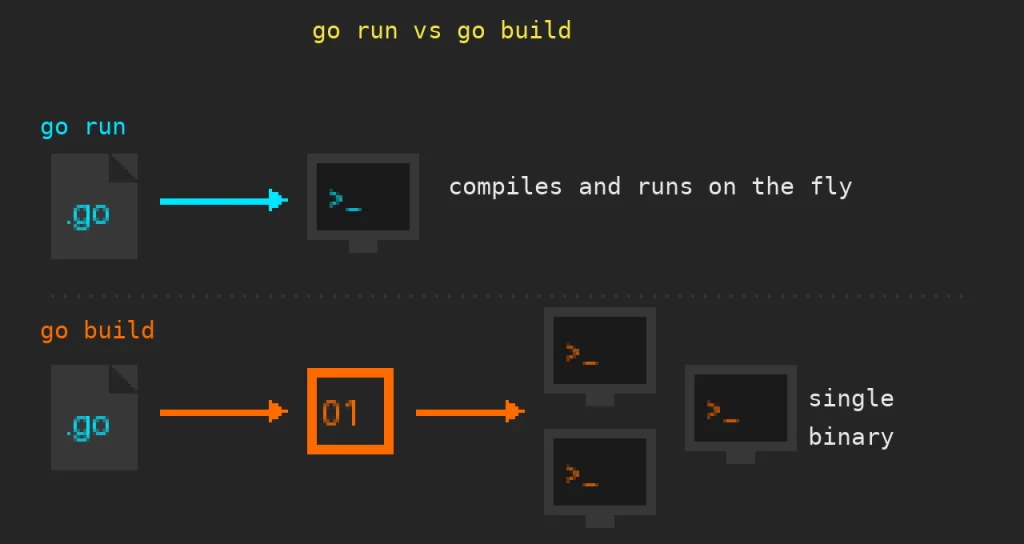
go run vs go build
Two commands you’ll use every single day:
go run .go run compiles to a temp directory and executes right away. No binary left behind. It’s your fast dev loop, the mental equivalent of python main.py or node index.js, except there’s a real compilation underneath.
go build
./hello
go build compiles and drops the executable in your folder. That file runs on any machine with the same OS and architecture, no Go installed.
Everyday analogy: go run is microwaving your lunchbox and eating it standing in the kitchen. go build is packing it to take anywhere you want. Docs: go.dev/cmd/go.
Weekly challenge
- You learn Go from scratch by typing, so…
- Install Go and check with go version.
- Change the program so the greeting uses your name stored in a variable (hint: name := “Guadua”).
- Build with go build and run the binary from another folder, no Go involved. Feel the single-binary power.
Next article: types, variables, constants and the mysterious iota.
Learn Go from scratch means exactly this: typing.
> exit