> whoami --open-sourceSeveral years writing code, and only now am I catching up to a mistake I’ve been dragging along the whole time: zero open source contributions. I’d bang my head against a wall if it did any good.
Not one team, not one manager, tech lead, or coworker ever brought it up. Repositories, yes, since day one. Commits, all of them. Pull requests, the rare ones, and when they showed up they either got approved without anyone actually looking, or reviewed with the sole purpose of making someone look sharp at someone else’s expense. No example to follow, no real incentive. I remember a PR sitting in review for days, pushing on it, and being told by my manager to just approve it myself. That’s one of the red flags telling you this isn’t the place you’re going to grow as a developer.
So this post isn’t a lesson from experience. It’s the roadmap I’m starting to contribute to open source, written down here in case it’s useful for yours too.
Let’s break it down.
What Open Source actually means (and what it doesn´t)
According to the [Open Source Initiative], the organization that has maintained the Open Source Definition since 1998, software only counts as “open source” once it clears a higher bar than “you can see the code.” It has to be freely redistributable, give access to the source, allow modification, and place no restrictions on how it’s used, commercial included. Pushing code to GitHub with no license attached isn’t open source. It’s visible code with the copyright still fully locked.
That distinction matters because the license is what legally lets you touch that code. Without one, you’re looking through a shop window, not walking into an open store.
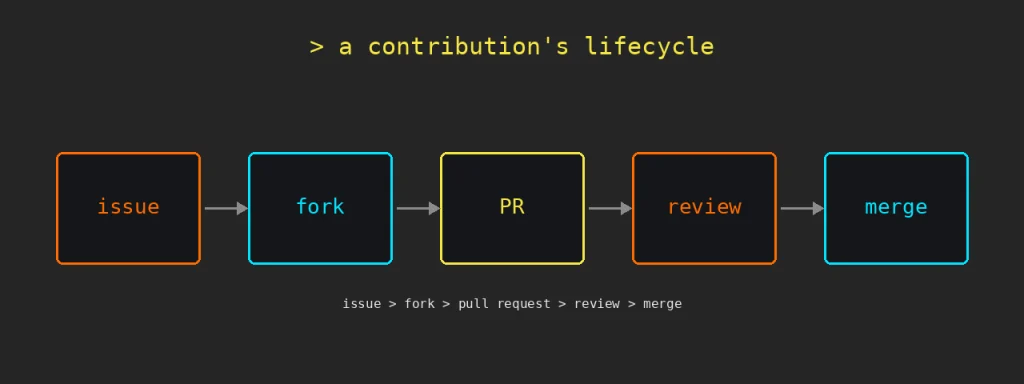
> contributing isn't just writing code. It’s filing a well-documented bug report, cleaning up confusing docs, translating, designing, reviewing someone else’s pull request. Code is just the most visible part, not the only one.
Quick glossary
So you don’t get lost further down:
– fork: your copy of the repo, a sandbox to break things without consequences.
– upstream: the original repo, the one that calls the shots.
– issue: a documented problem or request, the starting point for almost everything.
– pull request (PR): “here’s a change, tell me if you want it.”
– draft PR: a PR flagged as work in progress, for early feedback before it’s done.
– squash: flattening several commits into one before merging, so the history stays readable.
– merge conflict: the moment Git can’t tell which of two changes you actually want, a bad time to be in a hurry.
– CLA (Contributor License Agreement): a legal document some projects require you to sign before they accept your code.
– maintainer: whoever keeps the project running, reviews PRs, and decides what gets in.
Licenses: what actually decides if you can touch that code
Before touching anything, it’s worth knowing which license the project runs on. The three you’ll run into constantly:
MIT is the most common and the most permissive. You can use, copy, modify, publish, even sell software built on MIT code. The only requirement is keeping the original copyright notice.
Apache 2.0 shares MIT’s philosophy but adds something MIT doesn’t have: an explicit patent grant. If a contributor holds a patent covering their contributed code, Apache 2.0 explicitly grants permission to use that patent. More legal weight, same permissive spirit.
GPL is copyleft: if you distribute or modify GPL software, you have to release your version’s source code under that same license. It’s what powers the Linux kernel, and it’s why you can’t take GPL code, drop it into a closed product, and sell it as-is.
None of the three stop you from contributing. What changes is what you can do with the result afterward, and that’s worth knowing before you write the first line.
Why it matters (with numbers, not faith)
GitHub’s [Octoverse 2025 report] logged 1.12 billion contributions across public repositories over the year, up 13% year over year, with 518.7 million pull requests merged. A new developer joins the platform roughly every second. This isn’t a niche hobby, it’s the invisible infrastructure running underneath most of the software you use daily, from the framework in your stack to the linter running in your CI.
At the community level, contributing keeps alive the projects everyone depends on. Most free software runs on a small group of maintainers, many of them unpaid. Every closed issue, every fixed typo, is one less thing on their plate.
At the personal level, contributing is one of the few ways to have real code, reviewed by developers who don’t know you, sitting in a repo with public history. It works as a verifiable portfolio: anyone can read the diff, follow the PR discussion, and judge the work without you having to sell it yourself. And you learn to read someone else’s code under conventions you didn’t choose, a different skill than writing your own from scratch.
Contributing without writing code
Mentioned this above, but it deserves its own space: code is the most visible part, not the part most projects are actually short on.
Documentation: new tutorials, outdated guides nobody’s fixed, missing usage examples.
Translation: bringing docs or the interface into another language, widening who can actually use the project without depending on English.
Issue triage: reading, labeling, chasing missing information, closing duplicates. Invisible work that saves the maintainer hours.
Tests: writing test cases for functionality that doesn’t have any, without touching the business logic.
[Estimates on casual contribution patterns] put documentation, typo fixes, and translations at around 30% of all contributions. Not a second-tier contribution, an entry point as valid as any code PR.
How to pick the right project to contribute to Open Source
Picking the right project matters as much as picking the right issue. A few objective criteria before committing:
Recent activity: commits and closed issues from the last few weeks, not a year ago.
Response time: a healthy project usually reviews small PRs within 48 hours and merges them within 5 days. If the last open PR has been sitting for three months with no reply, that’s a signal.
Community spread: if 100% of commits come from one person, it’s a personal project wearing an open source label. Better to find one where a real share of PRs come from outside the core team.
Tone in the issues: if replies to other contributors read cold or hostile, it won’t be different with you.
Comparing three or four candidates against these filters before committing time avoids burning hours on a project that isn’t going to merge anything.
Tools to sort out before you start to contribute to Open Source
Before the first fork, there’s a short list worth having sorted.
Git installed and configured with your name and email, the ones that will stick to every commit forever.
An SSH key added to your GitHub account, so you’re not typing a username and password on every push. Generated and uploaded following [GitHub Docs’ official guide on SSH authentication](https://docs.github.com/en/authentication/connecting-to-github-with-ssh).
Commit signing, optional but worth it. [GitHub verifies GPG, SSH, or S/MIME signatures](https://docs.github.com/en/authentication/managing-commit-signature-verification/about-commit-signature-verification) to mark a commit as “verified” and confirm it actually came from you. Setting up signing with SSH is simpler than with GPG, though GPG has the edge of letting the key expire or get revoked once you stop using it.
GitHub CLI (gh), not required but saves steps: fork, clone, and open a PR from the terminal without touching the browser.
None of this is mandatory for the first PR, but setting it up once saves friction on the next one.
Tutorial: My first pull request, step by step
This is the flow I’m going to follow, as documented by [GitHub Docs]. Writing it out step by step so there’s no improvising when the moment comes.
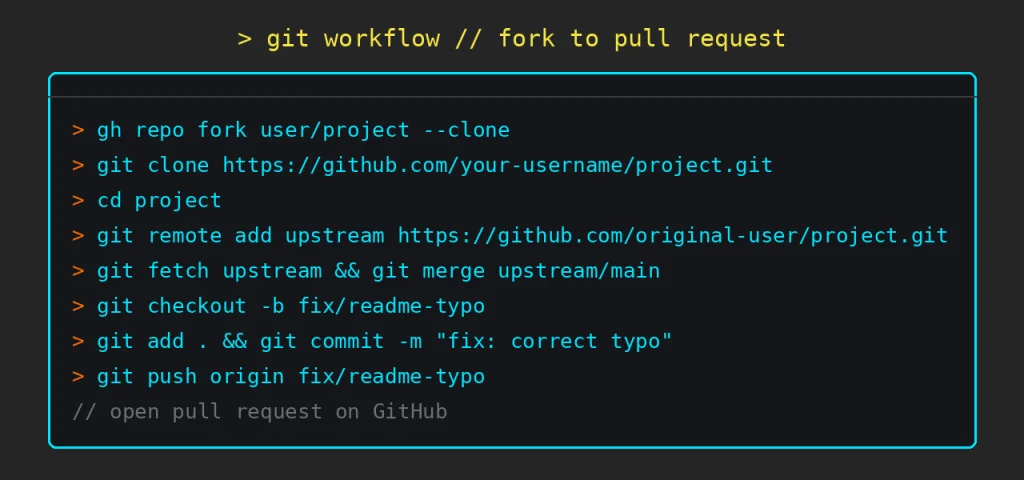
1. Pick the repository and read the rules before touching anything
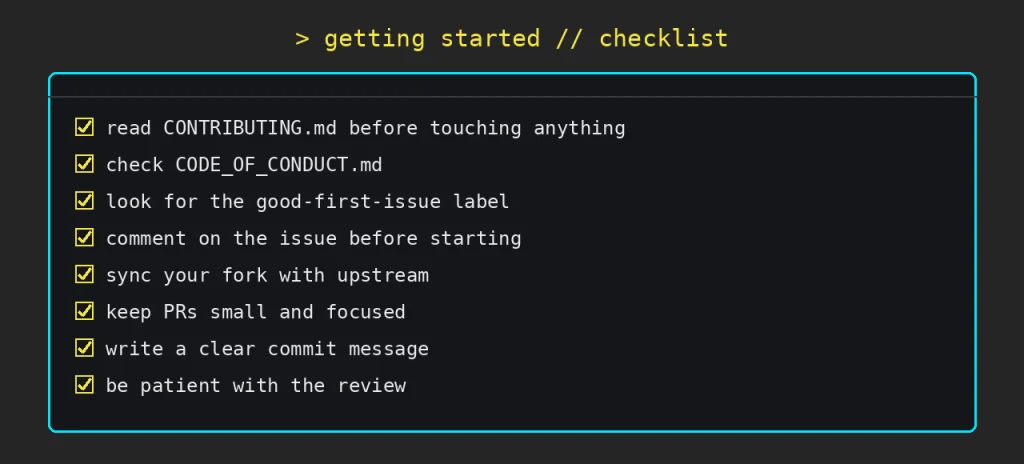
Look for a `CONTRIBUTING.md` file at the root of the repo. Almost every serious project has one, with the rules of the game: how to format commits, what tests to run, whether you need to sign a CLA. Check for a `CODE_OF_CONDUCT.md` too, most large projects adopt the [Contributor Covenant](https://www.contributor-covenant.org/), the most widely used code of conduct in open source, adopted by 9 of the 10 largest open source projects in the world. Skipping this is the fastest way to get your PR closed unread.
2. Fork
You don’t have write access to the original repo, so you make your own copy. “Fork” button, top right.
> gh repo fork user/project --clone3. Clone your fork locally
> git clone https://github.com/your-username/project.git
> cd project
4. Sync your fork before doing any work
A fork goes stale the moment the original repo moves forward. Before branching, add the original repo as a remote and pull the latest changes, so you’re not starting from an old base or dragging in avoidable conflicts.
> git remote add upstream https://github.com/original-user/project.git
> git fetch upstream
> git merge upstream/main
5. Create a branch with a descriptive name
Never work directly on `main`.
> git checkout -b fix/readme-typo6. Make the change, commit, push
> git add .
> git commit -m "fix: correct typo in installation section"
> git push origin fix/readme-typo
7. Open the pull request
On GitHub, clear title, description of what changes and why. If it closes an existing issue, reference it with `Closes: #15`. That links the PR to the issue and auto-closes it once merged.
8. Wait for review
A maintainer reviews, might request changes, might take days or weeks. That’s normal. It’s not a personal rejection, it’s someone with zero obligation to you spending their free time looking at your code.
Common beginner mistakes
A giant PR instead of a small one: huge changes are harder to review and far more likely to get closed with a “split this into smaller PRs.”
Not reading CONTRIBUTING.md or the PR template: the template exists so the maintainer has what they need without having to chase you for it.
Debating the approach inside the PR instead of the issue: design discussion happens earlier, in the issue. The PR is for reviewing code, not for arguing whether the idea makes sense.
Ignoring a red CI: a failing pipeline nobody looks at is the fastest way for a PR to sit unreviewed indefinitely.
Not syncing the branch with main before requesting review: an outdated PR creates conflicts the maintainer has no obligation to untangle for you.
Hacktoberfest: the yearly excuse to get started
If you need a deadline to stop putting it off, there’s one built for exactly that. [Hacktoberfest] is DigitalOcean’s annual initiative running every October: you register between September 15 and October 31, and the goal is merged pull requests on GitHub or GitLab projects tagged with the `hacktoberfest` topic. In the 2025 edition, the bar was 6 accepted PRs to complete the challenge, with digital badges along the way and a physical t-shirt for the first finishers. The exact rules for each year get published at hacktoberfest.com, worth checking before diving in since they shift from one edition to the next.
You don’t need to wait for October to contribute, but having a public date and counter helps when the holdup is procrastination, not lack of interest.
Tips to get started without Dying in the attempt
Look for projects that want new people, not just any project. There are sites built to aggregate exactly that:
– [Good First Issue] filters issues tagged as beginner-friendly across popular projects.
– [Up For Grabs] lists projects whose maintainers curate tasks specifically for new contributors.
– The [`good-first-issue` tag on GitHub Topics] does the same thing directly inside GitHub search.
Practice the full workflow with nothing at stake. [first-contributions](https://github.com/firstcontributions/first-contributions) is a repository built exactly for that: run through fork, clone, edit, PR on a project where getting it wrong has zero consequences.
Start small, literally. Typos, broken links, outdated docs, unclear error messages. Just as valid as fixing a complex bug, and it’s the entry point that costs the maintainer the least review time.
Read before you write. The history of closed issues and PRs tells you how that project talks, what gets rejected, what’s expected. Best unwritten documentation you’ll find.
Read the code of conduct before the source code. It tells you what tone that community expects and how conflicts get handled, information that in my own internal experience never existed in writing, and here it does.
Don’t treat it like an exam. “Changes requested” on your first PR is the review process working, not a verdict on whether you can code. And if nobody replies for weeks, it’s not personal, most maintainers do this in their spare time.
Be specific in the issue before writing any code. Comment that you want to work on it and wait for confirmation if the project asks for it. Avoids two people solving the same thing in parallel.
What happens if your PR gets rejected
A closed PR doesn’t mean the code was bad. It might not fit the project’s direction, a similar change might already be in progress, or the description might just be missing context.
The difference from the internal reviews I described at the start is in the expected response: here the comment is about the code, not about you, and the conversation is public, which leaves little room for unearned criticism without it showing.
If changes are requested, respond point by point: apply what makes sense, push back with reasoning on what doesn’t, no drama.
If there’s no reply for weeks, wait it out. Don’t push before a week or two, and then a short, polite comment asking if the PR is still on the table is fair game.
If it just gets closed, ask whether a different approach would be welcome. A plain “thanks for the feedback” and moving on is also a valid response.
None of these reactions depend on putting up with what I put up with in badly run internal reviews. Here the accountability mechanism is public, and that alone changes the rules of the game.
Where I`m starting to contribute to Open Source
This is my shortlist, not a generic list off the internet:
– [first-contributions] — to make a first PR with nothing to break, before touching a real project.
– [good-first-issue (DeepSource)] — easy issues on popular projects, for when I want something with more weight.
– [awesome-for-beginners] — filtered by language, so I can go straight to Java or whatever I’m using that week.
– [up-for-grabs.net] — for when I want out of tutorial mode and to find a project that actually needs hands.
> first open source commit: pending.